
Moving up from 5K
Give the new goal its own inputs.
Choose 10K Race and update your current running ability and training preferences. Review the generated sessions instead of using an old 5K calendar as the schedule for a new goal.
Your first or next 10K
Moving beyond a 5K or planning another 10K? Start with your current running ability, the days you can train, and a race date if you have one. Quovi turns those details into scheduled workouts you can open and review.
For iPhone · Available in the United States and Canada
Subscription required. Plans, localized pricing, and any eligible trial are shown before purchase.
10K
Your goal. Your days.
Your training plan.
6.2 miles · 10 kilometres
Built around your available days
Changes through Coach Q
Garmin + Apple Health imports
A new distance. Your current starting point.
Your last race explains where you have been. Your current ability and available days help shape what comes next. Use them to set up a 10K plan you can review against the rest of your week.
Moving up from 5K
Choose 10K Race and update your current running ability and training preferences. Review the generated sessions instead of using an old 5K calendar as the schedule for a new goal.
Returning to the distance
Set the days you can train now and add your next event date if you have one. Work, travel, and a different routine can mean that the plan for a previous race no longer fits.
Select 10K Race in your goal settings, whether this is a first attempt or another event.
Describe your experience as it is now, rather than relying only on a past race result.
Choose the weekdays you can regularly make room for and review your preferences.
Add your 10K date when you have one so it is part of the goal you plan toward.
Quovi supports the 10K Race goal. Your generated schedule depends on your inputs; there is no single course length or number of training days for every runner.
Inside Quovi
Start with the days you can train. The first screen shows a real 10K setup; the second illustrates Quovi's shared calendar with an example marathon plan.
Swipe to explore the steps
This fictional 10K runner selected Tuesday, Thursday, Saturday, and Sunday. Choose the weekdays that fit your own routine.
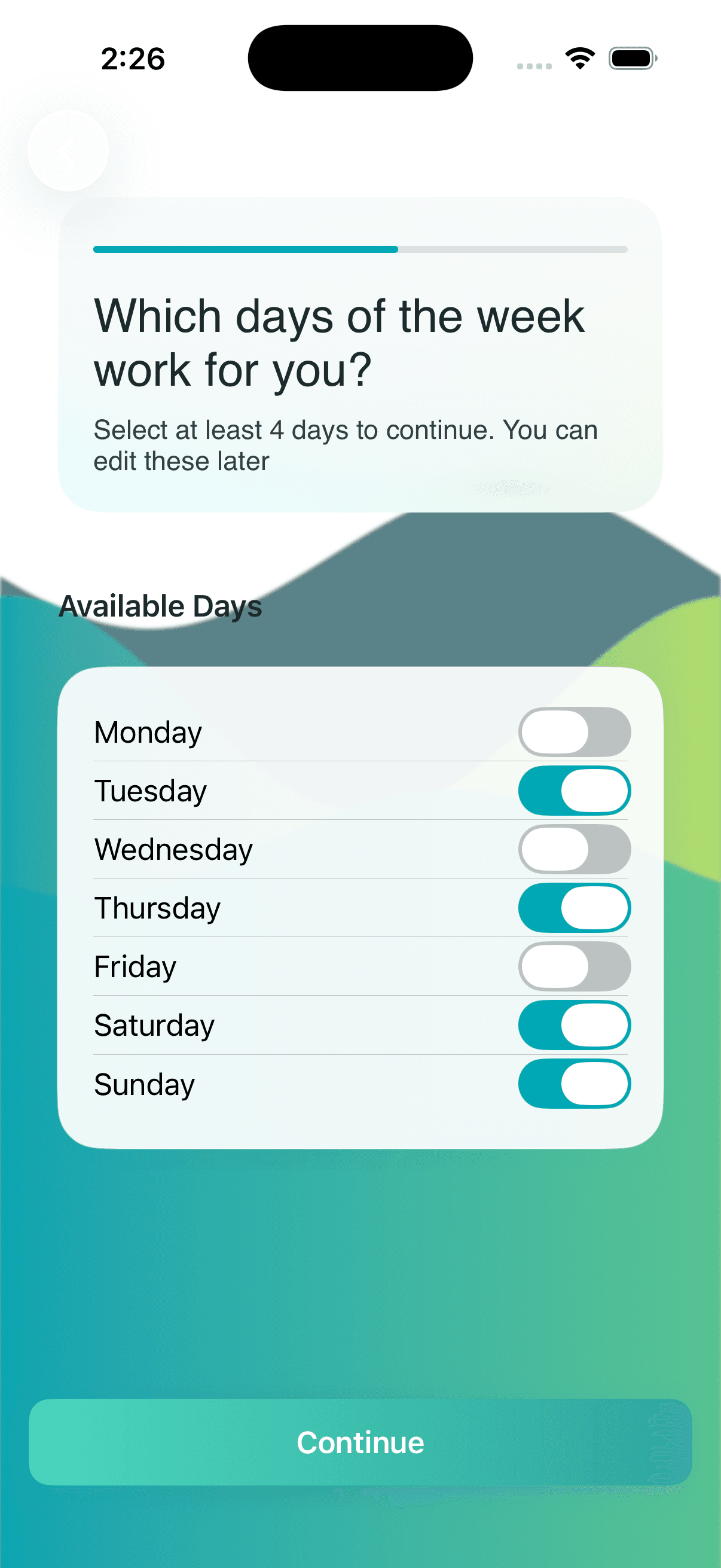
Use the calendar to move between scheduled days and see the selected workout. The image below belongs to a fictional marathon runner, not a generated 10K plan.
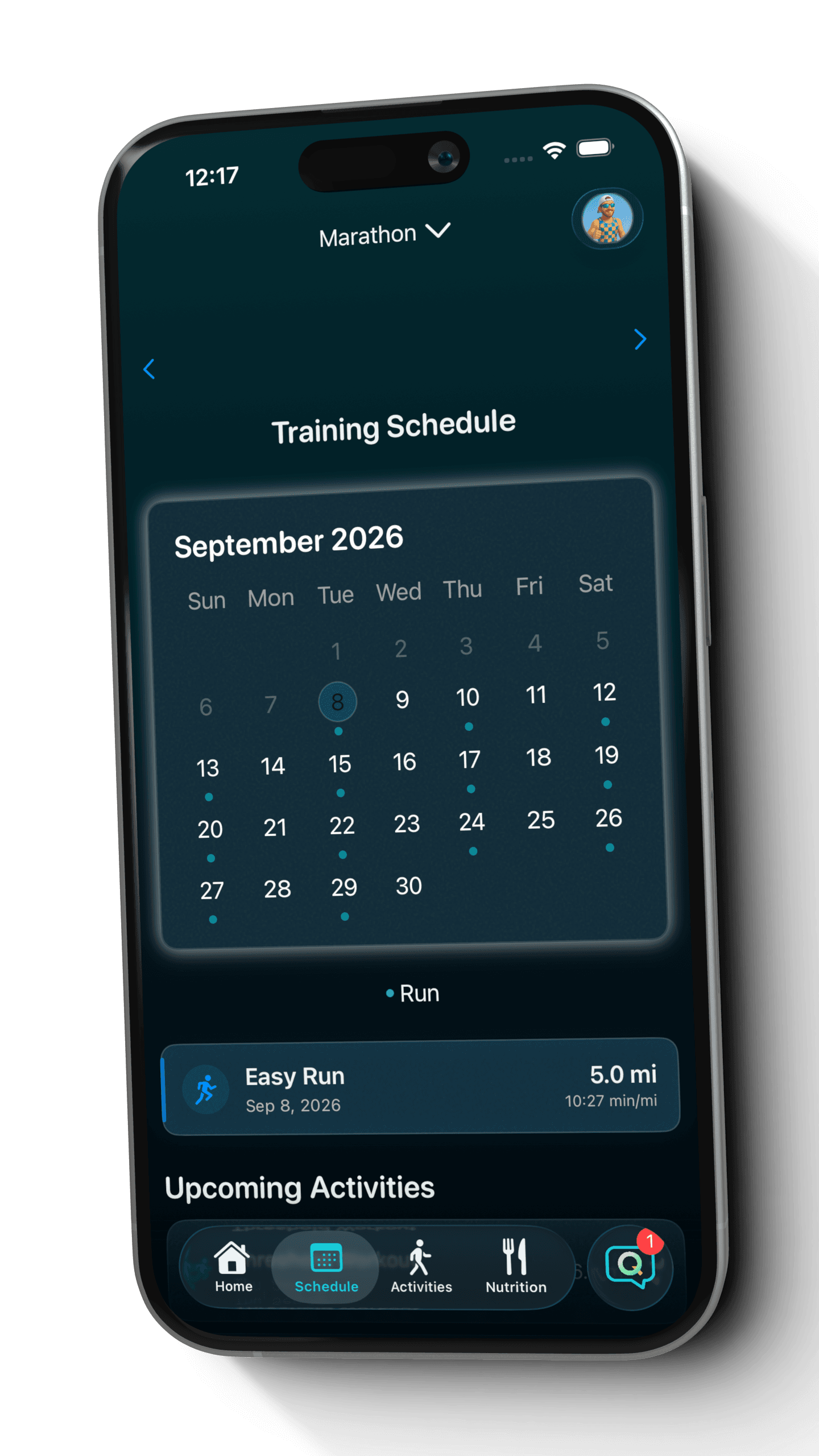
Genuine Quovi screens from fictional accounts. The calendar illustrates the shared interface with a marathon plan, not a sample 10K training schedule.
Keep the goal. Reshape the week.
Be specific about the workout and its new date. Coach Q can apply an individual move directly from your message, so check both the original day and the destination before following the updated week.
More about changing your running planAn example to try
“I can't train on Wednesday this week. Move that session to Thursday and keep my other training days unchanged.”
Check the result
Check that Thursday contains the moved workout, then review Wednesday and the sessions around it. For a recurring change, name the workout type and the weekday you prefer.
Record with your usual device and import completed activities into Quovi. Review the actual runs alongside the schedule as you work toward your 10K goal.
Apple Watch workouts arrive through Apple Health. You choose which connections and permissions to enable.
Before you download
Yes. Select the 10K Race goal and provide your current running ability and training preferences. Review the resulting workouts as a plan for the new goal, rather than treating a previous 5K schedule as a 10K plan.
No. A date is optional in Quovi's goal setup. Choose your 10K goal and add an event date if you have one, then review the plan generated from your details.
Quovi does not provide one fixed schedule for every runner. Your goal, current ability, training preferences, and any event date inform the generated plan. Open the calendar to see its actual scheduled sessions and dates.
Open your goal settings in Profile and choose 10K Race. Update the event date if needed, review your training preferences, and use Coach Q to build or discuss the plan for that goal.
Set the weekdays you are available in your training preferences. If a day changes, ask Coach Q for a specific workout move. You can also request a new weekday for a recurring workout type, such as long runs. Read the response and check the affected weeks in your calendar.
Quovi requires a subscription for core access, including personalized plans. Available subscription options, localized prices, and any eligible trial are shown in the app before purchase. Billing is managed through your Apple Account.
“Quovi is easy to use and quickly generates plans to your exact needs.”
Your next starting line

Subscription required. Review plans, localized pricing, and any eligible trial before purchase.