
Skip to content

Running plans for changing schedules

Your week changed. Your running plan can too.

A meeting takes Thursday. Travel takes the weekend. Tell Coach Q which workout needs to move and when you can run, then check the updated calendar. Keep your 5K, 10K, half-marathon, or marathon goal in view as the week changes.

For iPhone · Available in the United States and Canada

Subscription required. Plans, localized pricing, and any eligible trial are shown before purchase.

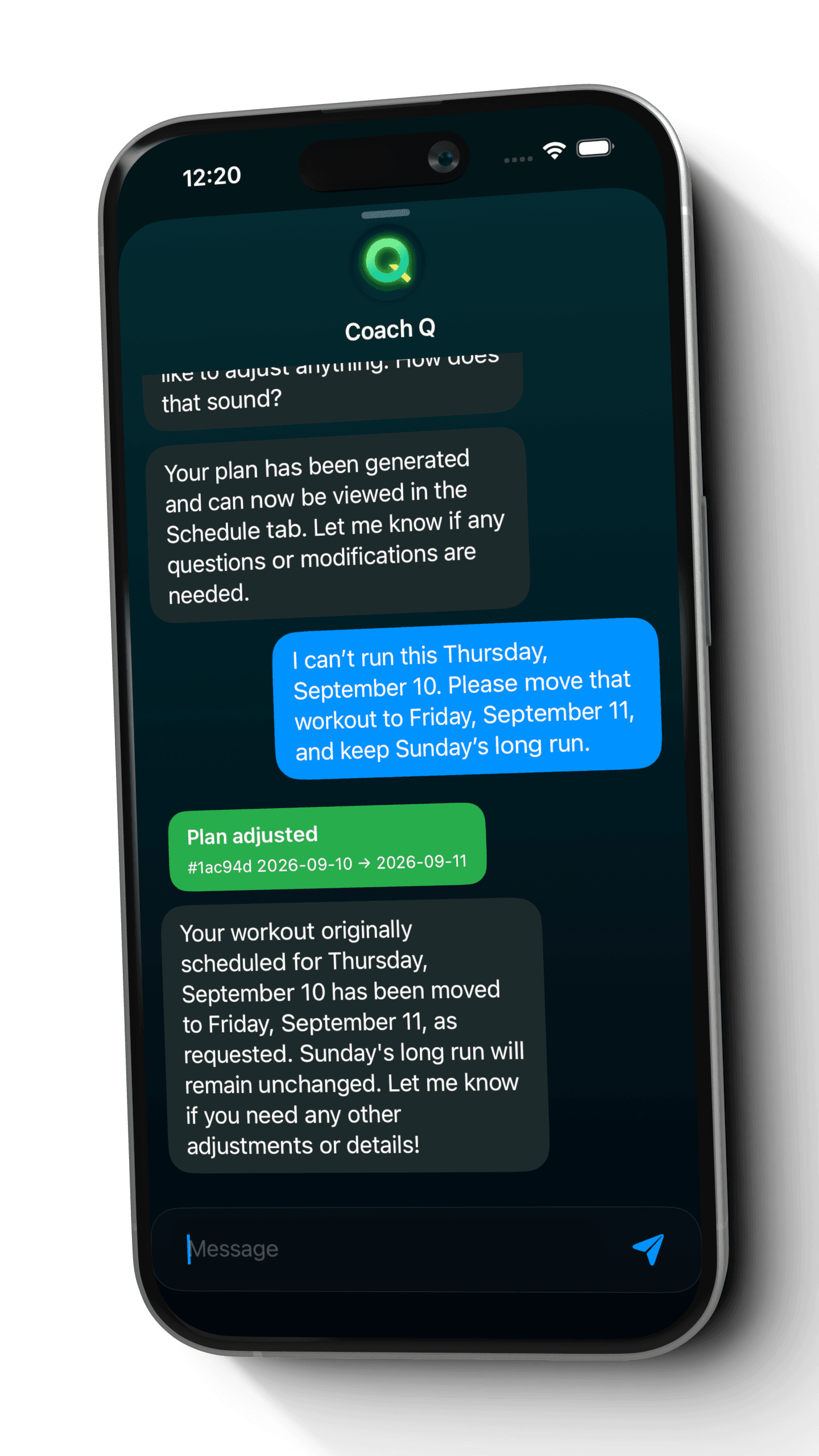
Coach Q applying a request to move a marathon workout from Thursday to Friday while keeping Sunday's long run
A real adjustment in an example marathon plan: Thursday's session moves to Friday.

Built around your available days

Changes through Coach Q

Garmin + Apple Health imports

Be specific about what changed

One disrupted day and a new weekly routine need different requests.

Start with the change you need, whether that is one workout this week or a recurring session that should move to a different weekday. Give Coach Q the dates or workout type and any sessions you want to keep in place, so you have a clear result to check in the calendar.

A one-off conflict

Name the workout and its new date.

If Thursday is no longer available, ask to move that day's workout to Friday. Mention the Sunday long run if you want it to stay where it is. The example below shows that specific request and its saved result.
A recurring session

Give future long runs a new day.

If Sundays no longer work for your long runs, ask Coach Q to move future long runs to Saturday. Name the workout type and preferred weekday, then review the upcoming weeks as well as the next session.

What shapes your adaptive plan

  1. 01

    Your existing goal

    Keep the race or running goal and its current date in view while planning a change.

  2. 02

    What needs to move

    Name the workout or date, rather than referring only to 'that run'.

  3. 03

    Your new availability

    Give a destination date for one session or a new weekday for a recurring workout type.

  4. 04

    What should stay

    Mention a long run or other session you want to keep in place, then check the result.

A specific workout move can apply directly from your message. Read Coach Q's response and check the updated calendar; a separate approval step is not required for every adjustment.

Inside Quovi

Thursday changes. The calendar follows.

This fictional marathon runner asked to move one session from Thursday to Friday while keeping Sunday's long run. These genuine Quovi screens show the plan, the request, and the saved result.

Swipe to explore the steps

  1. 1

    Start with the planned week

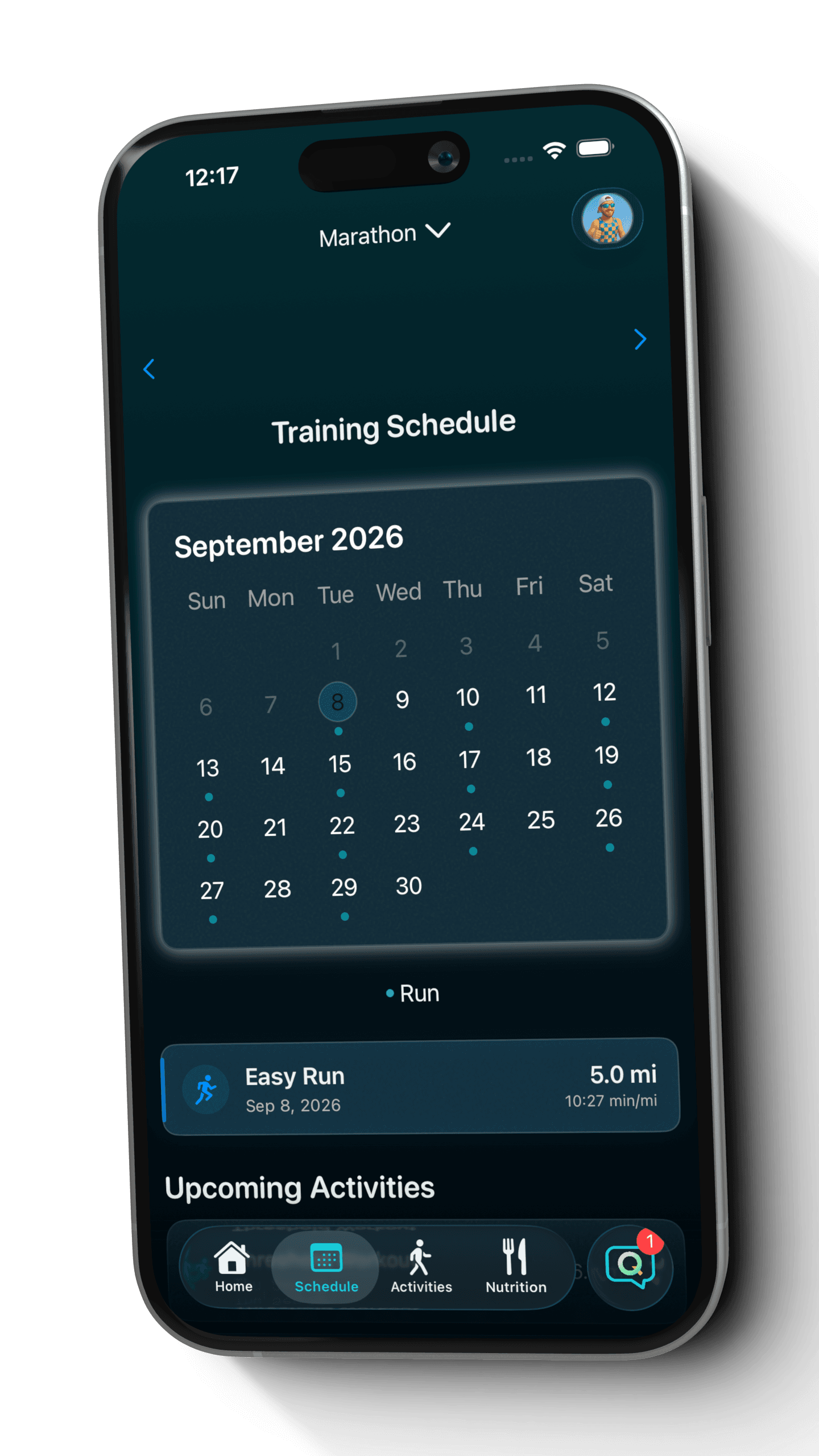
    Open the calendar to see the scheduled sessions and select a day for its workout details.

    Example Quovi marathon calendar before a schedule adjustment, with an easy run selected
    A generated marathon plan for a fictional runner. The workout details belong to this example.View full screenshot: Start with the planned week
  2. 2

    Ask for the specific change

    The request names Thursday's workout, Friday as the new day, and the Sunday long run to keep.

    Coach Q chat confirming that the September 10 workout moved to September 11 and the Sunday long run stayed in place
    Coach Q applied this move directly and confirmed the adjustment in the conversation.View full screenshot: Ask for the specific change
  3. 3

    Check the saved result

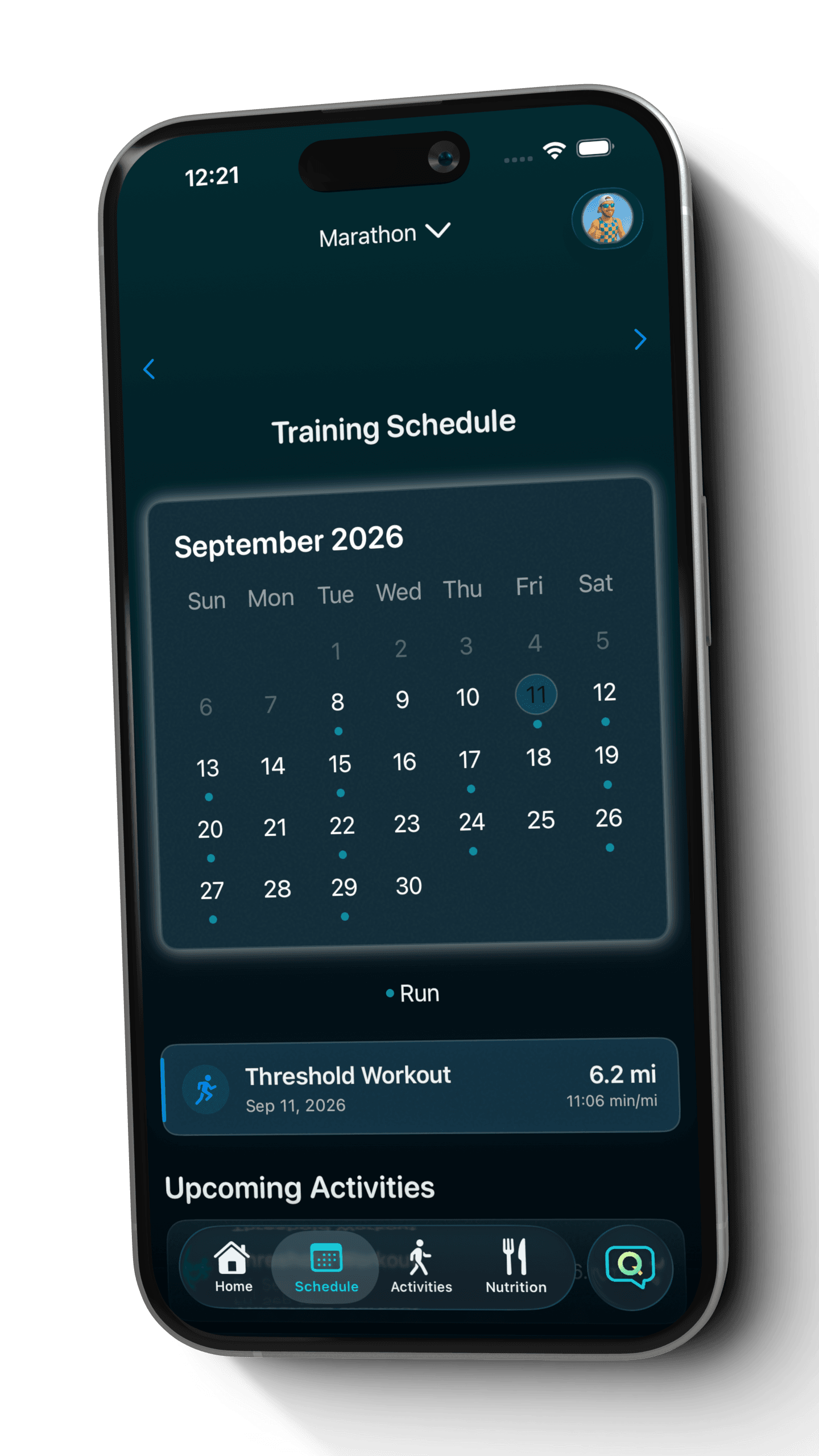
    Friday, September 11 now contains the moved workout. Check the original date and nearby sessions too.

    Saved Quovi marathon calendar showing the moved Threshold Workout on Friday, September 11
    The updated calendar shows the workout on Friday. This example's Thursday is now free of a scheduled session.View full screenshot: Check the saved result

This is one verified schedule change in a fictional runner's marathon plan. It demonstrates the adjustment workflow; your workouts and dates depend on your own plan.

Keep the goal. Reshape the week.

Make the result easy to check.

A useful request names both the change and the parts of your week you want to keep. After Coach Q responds, open the affected dates and the surrounding sessions. If the result misses something, ask for a specific correction.

Explore a marathon training plan

An example to try

I can't run this Thursday. Move that workout to Friday and keep Sunday's long run.

Check the result

Check Friday for the moved session, Thursday for the original entry, and Sunday for the long run. The conversation and calendar should describe the same change.

  1. 1. Ask Coach Q
  2. 2. Read the response
  3. 3. Check your calendar

Bring the week you completed into the conversation.

The planned schedule is only part of the picture. Import completed activities so you can review what you actually did before discussing the next change with Coach Q.

  • Connect Garmin or enable Apple Health permissions to bring completed activities into Quovi.
  • Review the planned session and available activity details together when they are linked.
  • Tell Coach Q about missed sessions or changes in availability instead of treating the old calendar as current.

Apple Watch workouts arrive through Apple Health. You choose which connections and permissions to enable.

Before you download

Questions about changing your plan

What does an adaptive running plan mean in Quovi?

You can ask Coach Q to change a plan when a training day no longer works. The example on this page shows an individual workout moved to a new date and saved in the calendar. You can also request a different weekday for a recurring workout type, such as future long runs.

Does a workout move need a separate approval?

Not always. The specific workout move shown above applied directly from the runner's request. Read Coach Q's response and check the affected dates in your calendar before following the updated schedule.

What should I tell Coach Q after missing a run?

Name the missed session, explain which days are now available, and mention any sessions you want to keep in place. Read the response and review the resulting week, rather than assuming the missed workout should simply be added to the next day.

Can I move my recurring long runs to another weekday?

Yes. Name the workout type and preferred weekday, such as asking to move future long runs from Sunday to Saturday. Review Coach Q's response and any proposed changes, then check the upcoming weeks in your calendar.

Can I keep recording with Garmin or Apple Watch?

Quovi can import completed activities through Garmin and Apple Health. Apple Watch workouts can arrive through Apple Health when the required permissions are enabled. Review those activities alongside the plan when considering a schedule change.

Do plan adjustments require a subscription?

Quovi requires a subscription for core access, including personalized plans and Coach Q. Available plans, localized pricing, and any eligible trial are shown in the app before purchase. Billing is managed through your Apple Account.

“Quovi is easy to use and quickly generates plans to your exact needs.”
Megantelope723 · App Store review · September 30, 2025
Read reviews on the App Store

Your next starting line

Give a changing week a clear next workout.

Download on the App Store

Subscription required. Review plans, localized pricing, and any eligible trial before purchase.