
Skip to content

Training for your first or next 5K

A 5K training plan for the days you can run.

Start with your current running ability, 5K goal, and available training days. Quovi puts the workouts on your calendar so you can see what comes next, whether this is your first race or your next attempt.

For iPhone · Available in the United States and Canada

Subscription required. Plans, localized pricing, and any eligible trial are shown before purchase.

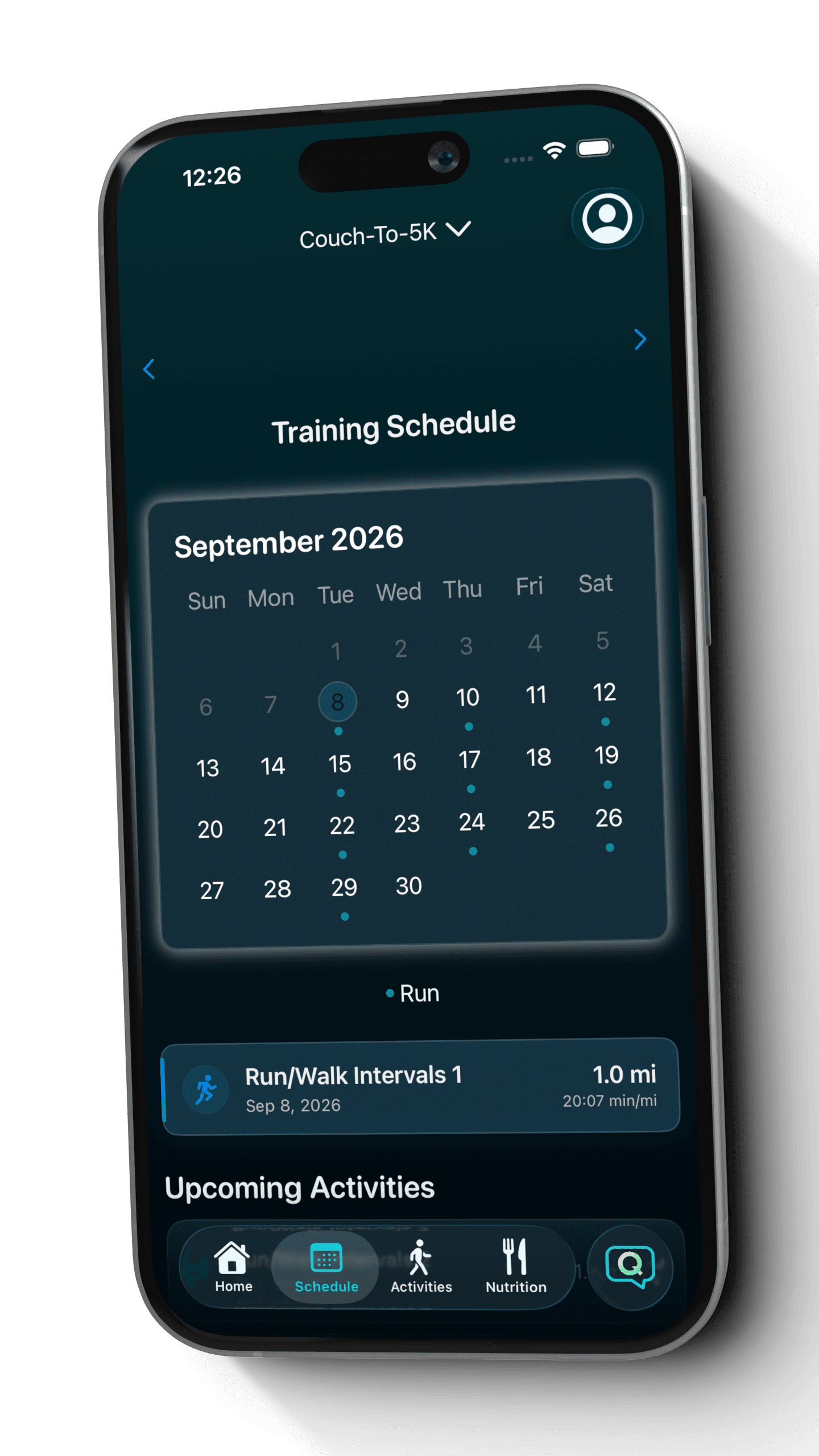
Quovi Couch-To-5K calendar with a scheduled Run/Walk Intervals workout
An example beginner 5K plan in Quovi, including a run/walk workout.

Built around your available days

Changes through Coach Q

Garmin + Apple Health imports

A small distance. A personal goal.

Your first starting line, or a fresh reason to run.

A first 5K and a return to running are different starting points. Tell Quovi where you are now and when you can train. Your plan turns those details into scheduled workouts you can review one day at a time.

Your first 5K

Give the goal a next step.

Choose the Couch-to-5K goal and tell Coach Q about your current fitness and available days. A personalized beginner plan can include run/walk sessions, with the workout details ready to open from your calendar.
Returning or racing again

Build from where you are now.

Set a new event date and current training preferences rather than picking up an old schedule unchanged. Bring completed runs into Quovi and see how they relate to the week you planned.

What shapes your 5K plan

  1. 01

    Your 5K goal

    Choose a 5K or Couch-to-5K goal, and add an event date if you have one.

  2. 02

    Your current ability

    Describe your running experience as it is today, including a return after time away.

  3. 03

    Days you can run

    Set your available training days so the schedule can fit your regular week.

  4. 04

    Your preferences

    Review your training preferences and the resulting workouts before you begin.

Couch-to-5K is an available goal in Quovi. Your plan is generated from your inputs, including your current fitness and available days; it is not the same fixed eight-week course for everyone.

Inside Quovi

A 5K goal you can see on your calendar.

Follow a generated beginner plan, a request to move a weekend session, and the result in the updated calendar.

Swipe to explore the steps

  1. 1

    Start with your schedule

    The Couch-to-5K calendar puts the generated workouts in one place. Select a day to see the session planned for it.

    Quovi Couch-To-5K calendar with a scheduled Run/Walk Intervals workout
    Example beginner 5K plan generated in Quovi for a fictional runner. Your workouts and schedule depend on your inputs.View full screenshot: Start with your schedule
  2. 2

    Move a session that doesn't fit

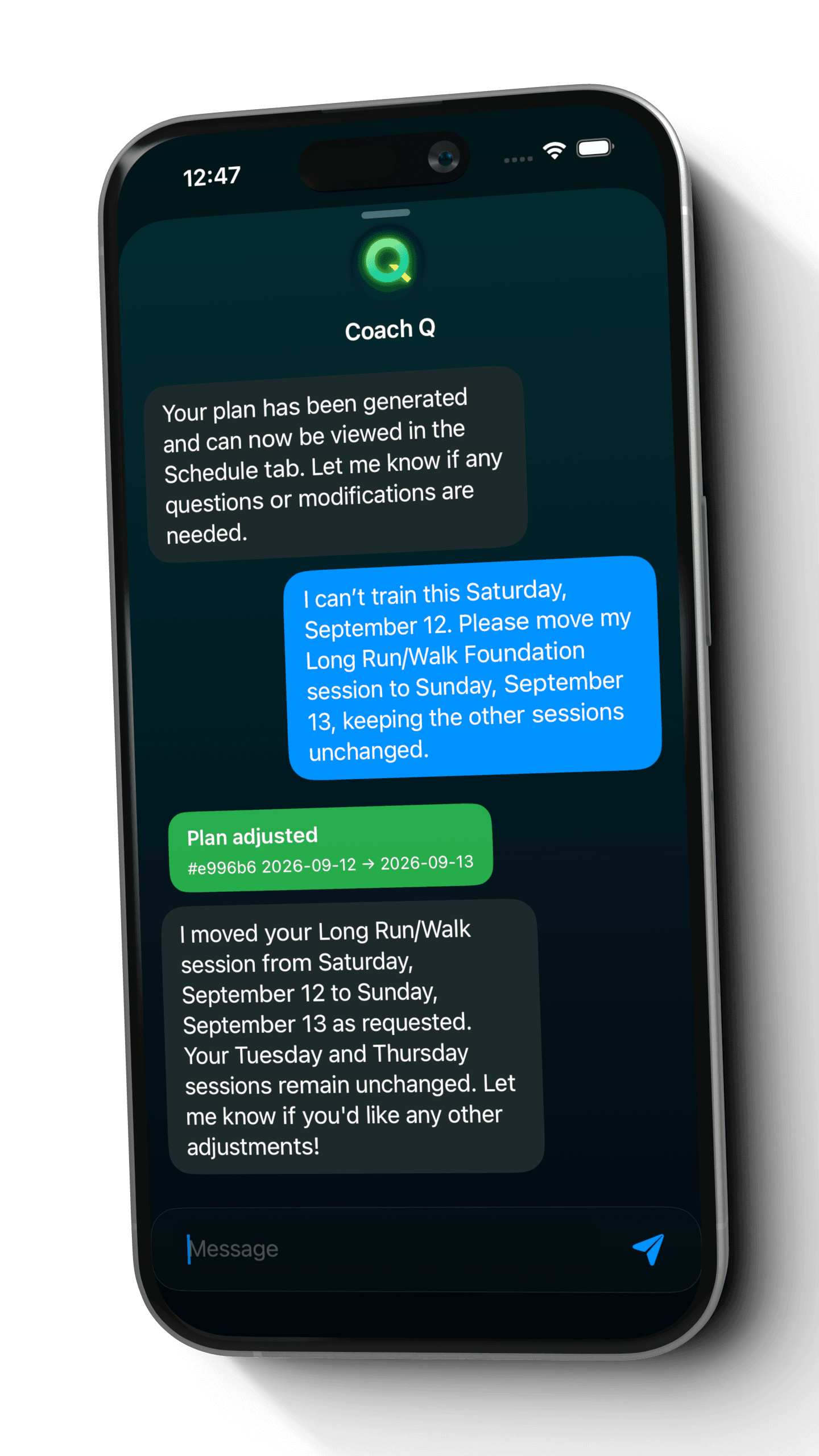
    The runner asks to move Saturday's run/walk session to Sunday while keeping the other sessions unchanged.

    Coach Q chat moving a 5K run/walk session from September 12 to September 13 with a successful Plan adjusted response
    Coach Q applied this session move directly from the runner's request.View full screenshot: Move a session that doesn't fit
  3. 3

    Check the new date

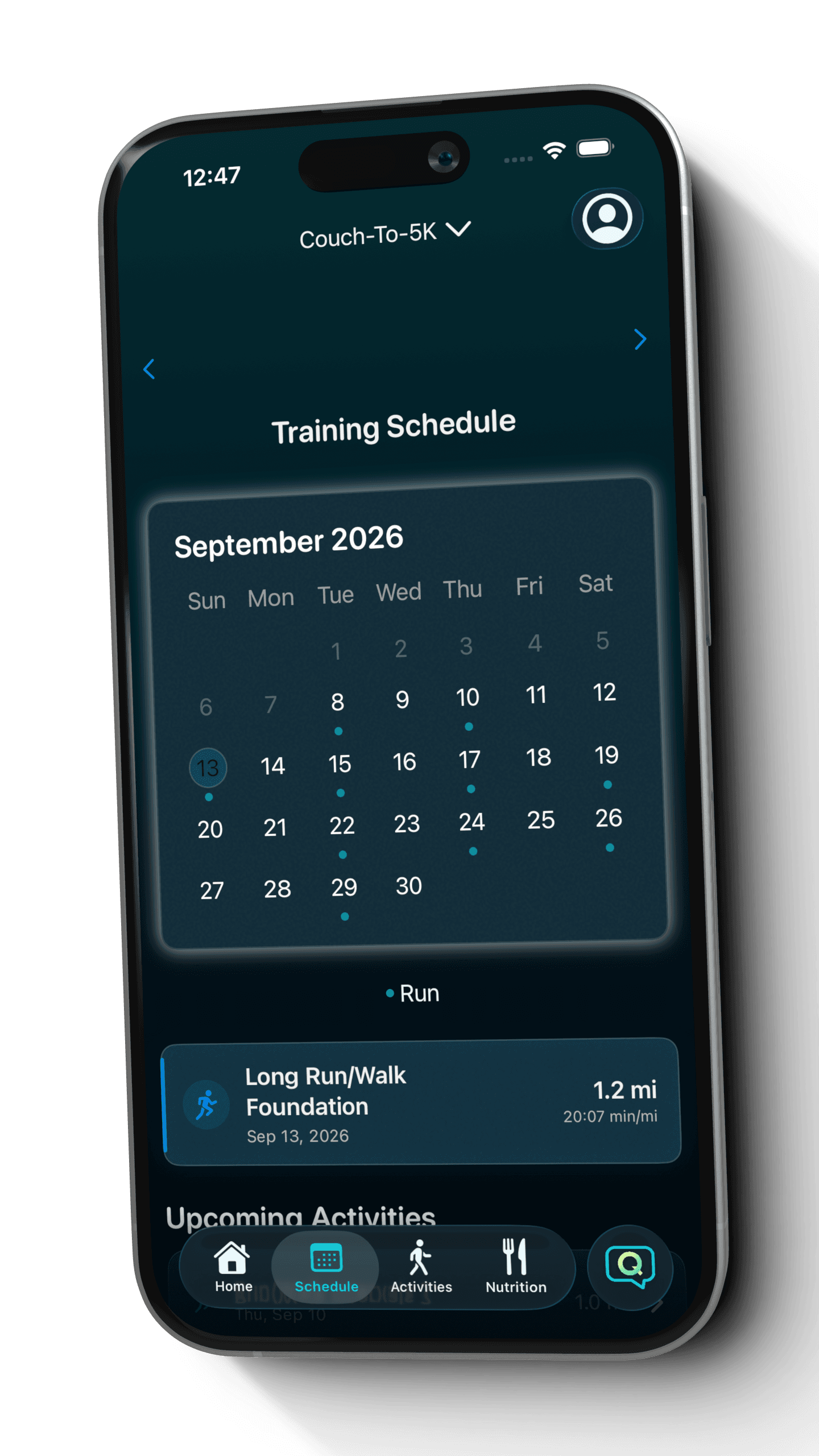
    The calendar now shows the Long Run/Walk Foundation session on Sunday, September 13.

    Updated Quovi Couch-To-5K calendar showing the moved Long Run/Walk Foundation session on September 13
    The updated 5K calendar shows this example session moved from Saturday to Sunday.View full screenshot: Check the new date

These are genuine Quovi screens from a fictional runner's generated plan and an actual schedule change. The example workouts are specific to that plan.

Keep the goal. Reshape the week.

When Saturday changes, your plan can change.

When a training day disappears, tell Coach Q which workout to move and where it should go. A specific move can be applied directly from your message, without manually rebuilding the plan yourself.

More about changing your running plan

An example to try

I can't train this Saturday. Move my run/walk session to Sunday and keep the other sessions unchanged.

Check the result

Read Coach Q's response, then open the calendar to check Sunday and the nearby sessions. If that date no longer works, request a correction.

  1. 1. Ask Coach Q
  2. 2. Read the response
  3. 3. Check your calendar

See the runs you did, not just the boxes on a calendar.

Keep using the device you already run with. Bring completed activities into Quovi and review them alongside your 5K training schedule.

  • Import completed runs from Garmin or Apple Health after connecting your account or granting permission.
  • Keep the planned workout and the completed activity together when they are linked.
  • Open the next scheduled session without piecing your week together across notes and spreadsheets.

Apple Watch workouts arrive through Apple Health. You choose which connections and permissions to enable.

Before you download

Your 5K questions, answered.

Can I use Quovi for my first 5K?

Yes. Choose the Couch-to-5K goal and tell Coach Q about your current fitness and available training days. A personalized beginner plan can include run/walk sessions, as shown in the example above. Open each workout to review the session details.

What does a Couch-to-5K plan cost?

Quovi requires a subscription for core access, including personalized Couch-to-5K plans. Available plans, localized pricing, and any eligible trial are shown in the app before purchase. Billing is managed through your Apple Account.

How many weeks does a 5K plan take?

There is no single duration for every runner. Give Quovi your current ability, availability, and an event date if you have one, then review the plan generated from those inputs. The calendar shows the actual scheduled sessions for your plan.

Can I change the days I run?

Yes. Set your available days during setup. Later, ask Coach Q to move a workout or change the weekday for a recurring workout type, such as long runs. A specific workout move can apply directly from your request, so read the response and check the updated calendar.

Can I bring in runs from Apple Watch or Garmin?

Quovi imports completed activities from Garmin and Apple Health. Apple Watch workouts can arrive through Apple Health when the required permissions are enabled. Use your usual device to record, then review the imported activity with your plan.

What if I want to work toward 10K next?

Quovi also supports 10K goals. When your goal changes, use your current ability, the new event date, and available days to build the next plan. A longer distance does not mean simply repeating or doubling the 5K schedule.

“Quovi is easy to use and quickly generates plans to your exact needs.”
Megantelope723 · App Store review · September 30, 2025
Read reviews on the App Store

Your next starting line

Put your 5K goal on a calendar that fits your life.

Download on the App Store

Subscription required. Review plans, localized pricing, and any eligible trial before purchase.