
Skip to content

Your 26.2, your training days

A marathon training plan built around your week.

Set your race date, current running ability, and available days. Quovi puts your marathon workouts on a calendar, then helps you adjust the plan when the rest of life moves.

For iPhone · Available in the United States and Canada

Subscription required. Plans, localized pricing, and any eligible trial are shown before purchase.

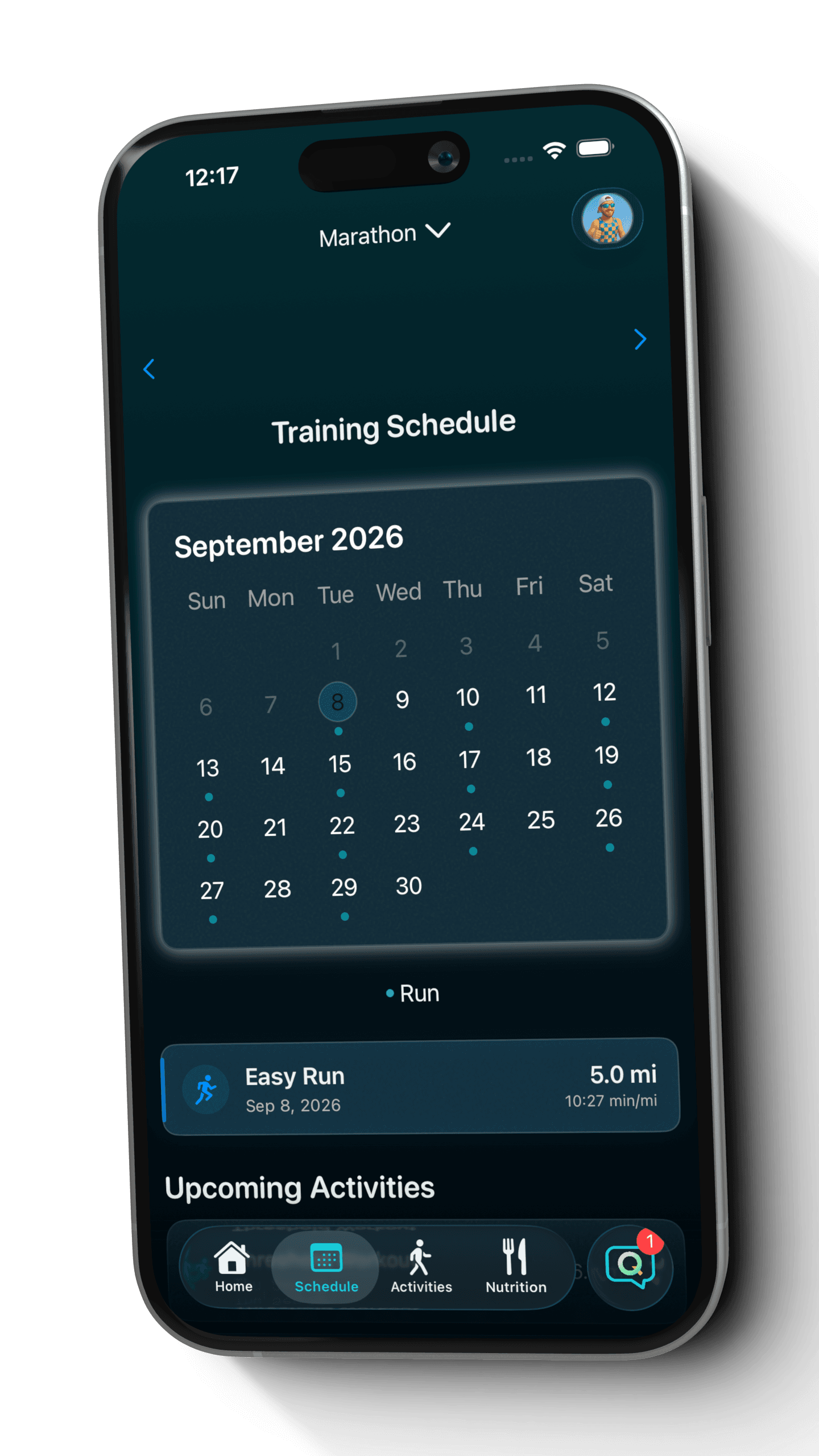
Quovi marathon training schedule showing a populated September calendar and a planned 5-mile easy run
An example marathon plan in Quovi. Your workouts and schedule depend on your inputs.

Built around your available days

Changes through Coach Q

Garmin + Apple Health imports

A race date is only the beginning

Make the whole build fit the week you actually have.

A marathon plan has to work beyond the long run. Work, family, and travel all compete for the same calendar. Start with your real availability so your plan reflects the training days you can make room for.

Your first marathon

Start from the runner you are today.

Give Quovi your current ability and race date, rather than choosing a schedule based only on a finish-time ambition. Review the generated workouts, their timing, and your recovery days before getting started.
Your next marathon

Give your next build a clear structure.

Set your next goal and long-run preference, then see the sessions that lead toward race day. Bring completed activities in from Garmin or Apple Health to keep the plan and the work together.

What shapes your marathon plan

  1. 01

    Your race goal

    Choose marathon and give Quovi the event date you are working toward.

  2. 02

    Your starting point

    Describe your current running ability so the plan begins with your experience.

  3. 03

    Your available days

    Choose training days that work with the commitments already on your calendar.

  4. 04

    Your long-run day

    Set the day you prefer for the longer session that needs more room in your week.

Your generated schedule depends on your inputs. Quovi does not prescribe the same weekly mileage or fixed number of weeks to every marathon runner.

Inside Quovi

A planned week. A changed day. A clear result.

Follow one marathon plan from its generated schedule to a specific workout move and the updated calendar.

Swipe to explore the steps

  1. 1

    See the work ahead

    The generated marathon calendar shows the upcoming training days and the selected day's easy run.

    Quovi marathon training schedule showing a populated September calendar and a planned 5-mile easy run
    Example marathon plan generated in Quovi from a fictional runner's goal, race date, and training preferences. Your schedule depends on your inputs.View full screenshot: See the work ahead
  2. 2

    Ask for a specific move

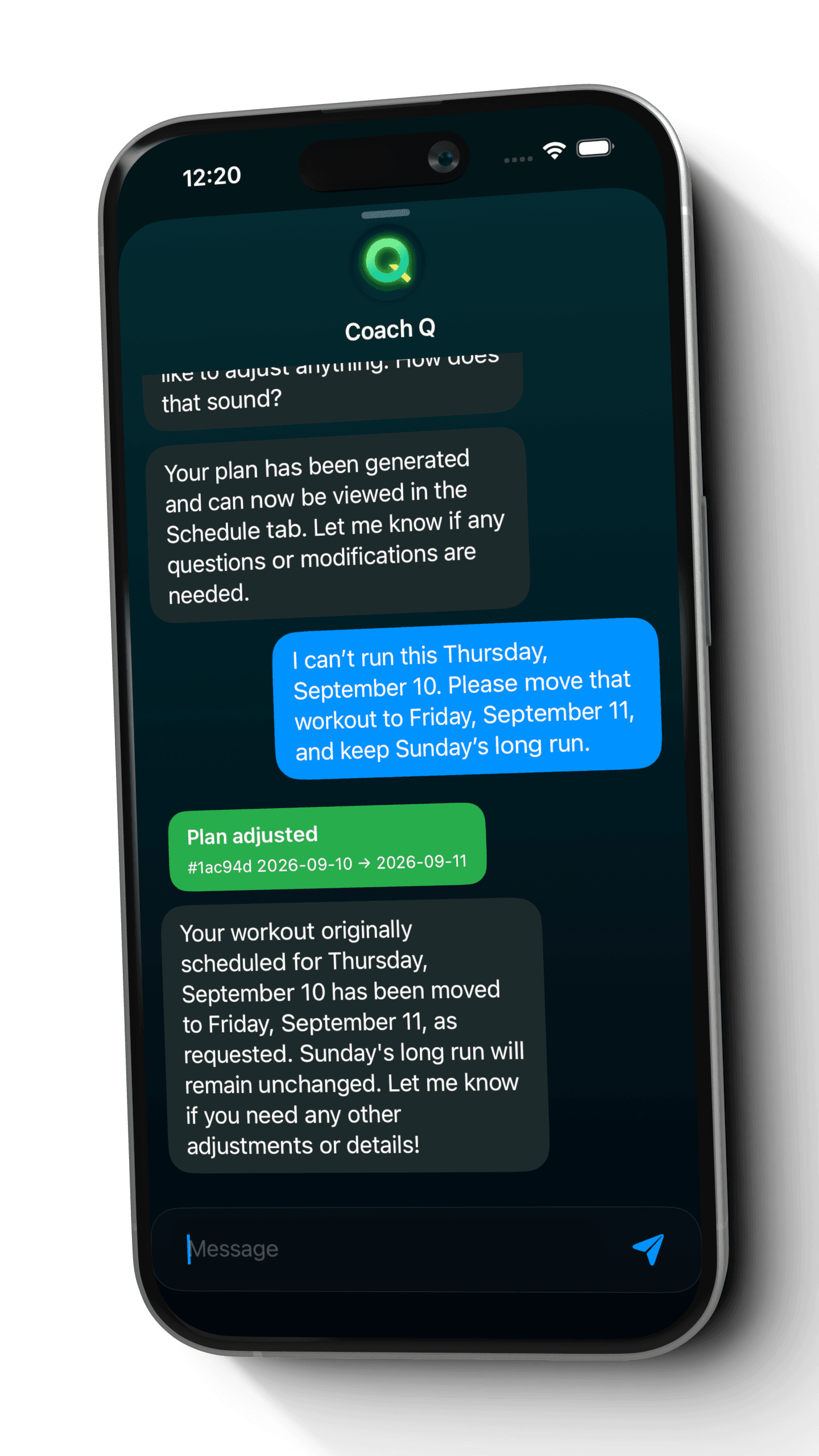
    The runner asks to move Thursday's workout to Friday and keep Sunday's long run.

    Coach Q chat showing a request to move the September 10 marathon workout to September 11 and a successful Plan adjusted response
    Coach Q applied this workout move directly from the request and confirmed the change.View full screenshot: Ask for a specific move
  3. 3

    Check the updated calendar

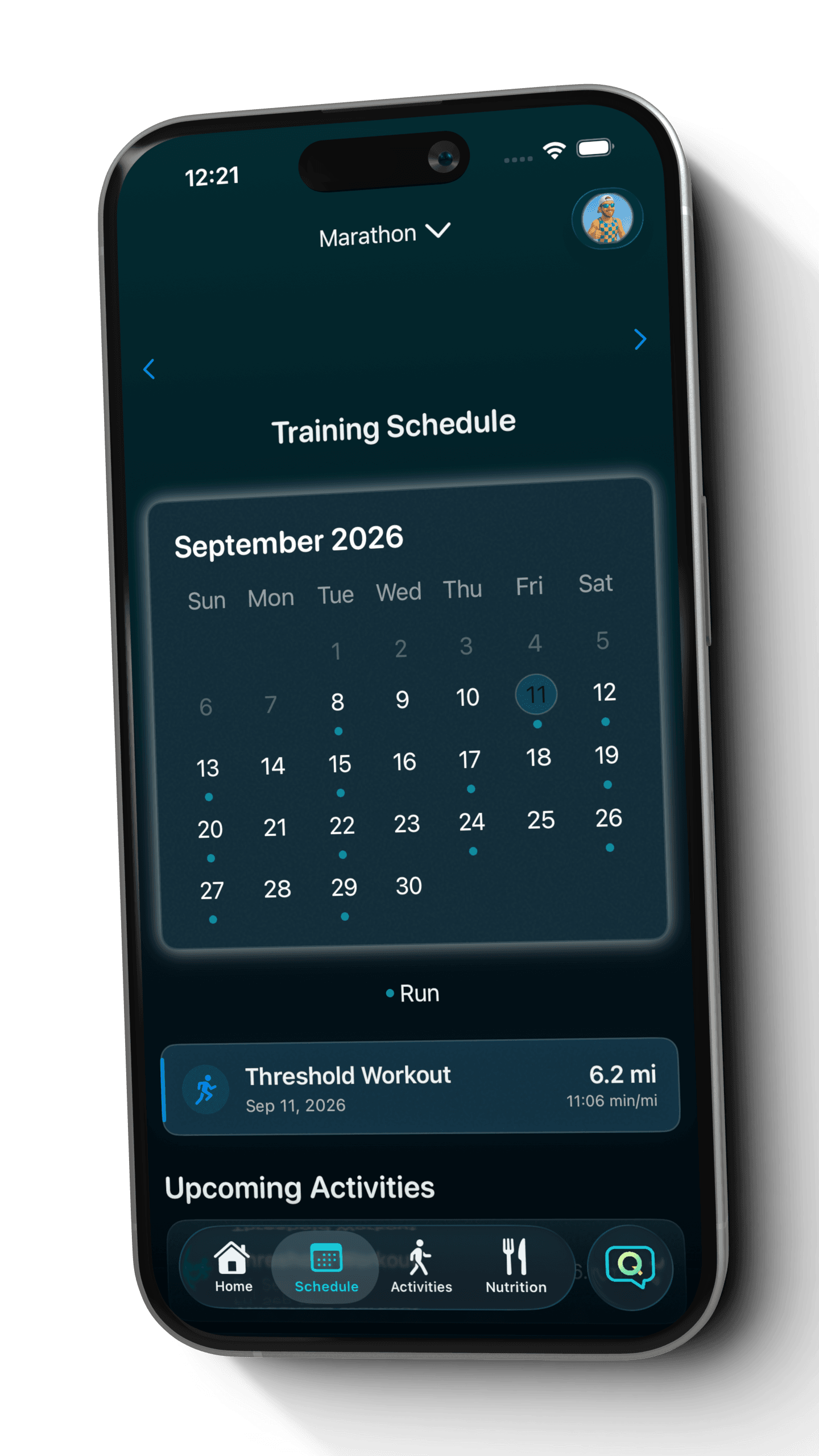
    Friday, September 11 now contains the moved workout. Thursday, September 10 no longer has a session.

    Updated Quovi marathon calendar with September 11 selected and the moved Threshold Workout displayed
    The updated marathon calendar shows the moved session on Friday, September 11.View full screenshot: Check the updated calendar

Screens show a fictional runner's generated plan and an actual schedule change in Quovi. Your workouts, dates, and paces depend on your own inputs.

Keep the goal. Reshape the week.

Move the workout. Keep the week in view.

When a commitment takes over, tell Coach Q which session to move and the date you want. A specific workout move can take effect from that message, so read the response and check the updated calendar.

More about changing your running plan

An example to try

I can't run this Thursday. Move that workout to Friday and keep Sunday's long run.

Check the result

Check that the moved session appears on Friday and review the surrounding workouts. If the result does not fit, ask for a specific correction.

  1. 1. Ask Coach Q
  2. 2. Read the response
  3. 3. Check your calendar

Keep completed miles beside the plan.

Your calendar tells you what was planned. Imported activities add the work you completed, so you can review the training cycle with both in view.

  • Connect Garmin or Apple Health to bring completed activities into Quovi.
  • Open a workout to review the prescribed session and available completed-activity details.
  • Use that context when asking Coach Q about your next schedule adjustment.

Apple Watch workouts arrive through Apple Health. You choose which connections and permissions to enable.

Before you download

Your marathon questions, answered.

Is this a fixed 16-week marathon plan?

No. Quovi generates a personalized plan using your race goal, event date, current ability, and training preferences. It is not a single downloadable 16-week schedule or a universal weekly mileage prescription.

Can I choose my long-run day?

Yes. Set your preferred long-run day during plan setup. If that preference changes later, ask Coach Q for an adjustment, read the response, and check the resulting schedule.

What if my marathon date changes?

Update the event date in your goal settings and tell Coach Q about the change. Ask to review the plan for the new date, then check the resulting sessions and any proposed adjustments. Updating the goal date alone does not mean every workout has been rescheduled.

Can I move a workout without rebuilding my whole plan?

Yes. Individual workout moves can apply directly from your request to Coach Q. State the session and destination date clearly, then read the response and check the result in your calendar.

Does Quovi record my runs or connect to my watch?

Quovi imports completed activities through Garmin and Apple Health, including Apple Watch workouts shared with Apple Health. Record with your usual device or compatible app, then use the imported activity alongside your Quovi plan.

What does the marathon plan cost?

Quovi requires a subscription for core access. Available subscription plans, localized prices, and any eligible trial are shown in the app before purchase. Billing and subscription management are handled through your Apple Account.

“Quovi is easy to use and quickly generates plans to your exact needs.”
Megantelope723 · App Store review · September 30, 2025
Read reviews on the App Store

Your next starting line

Give your marathon goal a plan built for real life.

Download on the App Store

Subscription required. Review plans, localized pricing, and any eligible trial before purchase.